 The Power News! Overview
 Power News! is a Power Automate flow that aggregates current Power Platform news from Microsoft RSS feeds and community blogs across the internet.
It provides a centralized source for product updates, articles, announcements, and practical information to help employees stay informed.
Power News! is a Power Automate flow that aggregates current Power Platform news from Microsoft RSS feeds and community blogs across the internet.
It provides a centralized source for product updates, articles, announcements, and practical information to help employees stay informed.
Core capabilities
- Aggregate RSS Feeds:
Aggregate Power Platform updates, news, and announcements from Microsoft RSS feeds. - Community Blogs:
Include community blogs and articles covering Power Apps, Power Automate, Power BI, Power Pages, Copilot, and related tools. - Article Overviews:
Present article summaries with links to the full content. - Engagement Resources:
Provide community engagement resources, including solution sharing, guest-speaker opportunities, and event information to over 5,000 employees and subscribers.
Intended audience and value
The flow is designed for Power Platform users, developers, administrators, and community members who want a convenient way to follow platform developments.
By bringing official updates and community perspectives together, Power News! helps employees discover relevant information, stay current, and share knowledge more efficiently.
Purpose
The goal was to create more than a scheduled collection of links. Power News! was designed as an automated content-curation experience that brings current Power Platform news, product updates, announcements, articles, and practical information together in one consistent source.
Built with Power Automate, the flow aggregates Microsoft RSS feeds and community blogs across the internet, summarizes relevant content, and delivers the digest to subscribers every Monday afternoon. It also connects readers with opportunities to share solutions, participate in the community, and learn about guest speakers and events.
Case-Study Type: UX/UI Design
Solution Type: Power Automate / RSS
Understanding the opportunity
The Power Platform ecosystem is broad and continuously changing. Important updates, product announcements, technical articles, and community insights can be distributed across many Microsoft and external sources, making it difficult for employees to know what is relevant and worth their attention.
Readers needed a convenient way to stay current without monitoring multiple feeds individually. The experience also needed to do more than list links: it needed to provide enough context for readers to quickly understand each item and decide whether to explore the full content.
The Experience Challenge:
How do we turn a constantly changing set of Power Platform updates and community perspectives into a concise, useful, and repeatable source of information that employees can act on?
This framing influenced the RSS-source strategy, content hierarchy, article summaries, weekly delivery schedule, link structure, visual organization, and community engagement content.
Discovery considerations
The discovery work focused on understanding the information needs of Power Platform users and the content sources that could provide a balanced view of official updates and community knowledge.
Key discovery considerations included:
- Aggregating current updates and announcements from Microsoft RSS feeds.
- Including community blogs and articles covering Power Apps, Power Automate, Power BI, Power Pages, Copilot, and related tools.
- Delivering the digest on a predictable schedule so subscribers know when to expect it.
- Providing article summaries and direct links to full content.
- Organizing information so readers can scan the digest quickly and choose what to read.
- Connecting readers with solution sharing, guest-speaker opportunities, and event information.
These considerations led to an automated experience that combines broad source coverage with a focused weekly delivery format.
Experience strategy and customer journey
The strategy was to organize Power News! around a repeatable information journey: discover what changed, understand why it may matter, explore the full article, and engage with the broader Power Platform community.
The Power Automate flow supports a progression from source aggregation, to content selection and summarization, to a structured weekly digest delivered directly to subscribers.
The strategy was guided by five principles:
- Centralized discovery: Bring updates from multiple sources into one dependable digest.
- Official and community balance: Pair Microsoft product information with practical perspectives from community blogs and articles.
- Scanable context: Provide concise summaries so readers can evaluate content quickly.
- Consistent cadence: Deliver Power News! every Monday afternoon as a predictable knowledge-sharing touchpoint.
- Actionable engagement: Connect readers to full articles, solution-sharing opportunities, guest speakers, and events.
This strategy turns fragmented platform information into a repeatable learning and awareness experience for Power Platform users.
Information architecture and content structure
A significant part of the experience was deciding how to organize diverse sources and content types into a digest that could be read quickly while still providing useful context.
The primary experience areas include:
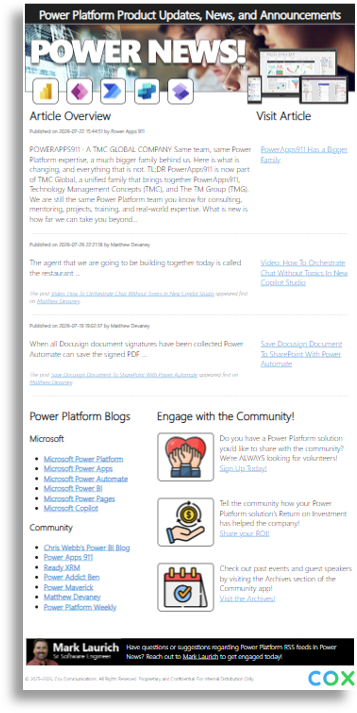
- Power News! header: Establishes the digest as a recognizable source for Power Platform product updates, news, and announcements.
- Article overview: Presents selected items with publication information, summaries, and links to the full article.
- Visit Article links: Give readers a direct path from the digest to the original source content.
- Power Platform blogs: Organizes Microsoft and community sources across Power Apps, Power Automate, Power BI, Power Pages, Copilot, and related topics.
- Engage with the Community: Connects readers with solution sharing, community participation, guest speakers, and event information.
- Delivery context: Reinforces the recurring Monday-afternoon cadence and the digest’s role as an ongoing knowledge resource.
The screenshot reference illustrates this structure through the Power News! header, Article Overview section, article summaries and links, Power Platform Blogs list, and community engagement content.
The content structure was designed to help readers enter through a new update, a specific product area, a community resource, or an engagement opportunity and still reach a clear next step.
UX/UI design and visual system
The experience design translated the automation strategy into a recognizable, newsletter-style communication.
The reference design uses a prominent branded header, article groupings, summaries, source links, product icons, categorized blog lists, community imagery, and calls to action to help readers understand the digest and decide where to go next.
The design work included:
- Establishing a strong Power News! identity so the digest is recognizable when it arrives in a subscriber’s inbox.
- Creating a clear Article Overview section for quickly scanning current updates.
- Separating article summaries from Visit Article links so context and action are easy to distinguish.
- Organizing Microsoft and community sources into readable topic groupings.
- Using visual icons and imagery to create hierarchy across technical content and community resources.
- Creating a dedicated Engage with the Community area for solution sharing, participation, and events.
- Balancing information density with readable spacing, headings, and concise content blocks.
- Maintaining a consistent format that can be populated automatically by the Power Automate flow.
The design intent was to make Power News! feel timely and useful while providing enough visual structure for readers to scan a broad range of content efficiently.
Copywriting and content design
Copywriting and content design were central to the experience because the value of the digest depends on helping readers understand why an article or update may be relevant before they open it.
The content-design work included:
- Naming the digest and establishing the Power News! voice.
- Ensuring concise article summaries are provided with the source article.
- Writing necessary email-compatible HTML3.2 to display publication information, article titles, source attribution, and Visit Article links within the source RSS feeds.
- Organizing Microsoft and community blogs into recognizable product and topic groupings.
- Writing calls to action for solution sharing, community participation, guest speakers, and events.
- Defining terminology consistently across Power Apps, Power Automate, Power BI, Power Pages, Copilot, and related tools.
The result is a content model that treats summaries, labels, source links, and calls to action as part of the experience—not simply text added after the automation was built.
Development and automation collaboration
The development phase required translating the content strategy and digest structure into a working Power Automate flow.
The focus was on preserving the intended source aggregation, article-selection logic, summary presentation, link behavior, delivery schedule, and community content during implementation.
The automation-to-content process included:
- Connecting the flow to Microsoft RSS feeds and community blogs across the internet.
- Aggregating current Power Platform updates, articles, announcements, and practical information.
- Preparing article summaries with links back to the full content.
- Structuring the content into a consistent newsletter format.
- Scheduling Power News! for delivery to subscribers every Monday afternoon.
- Including community engagement resources alongside product and article updates.
- Balancing timely content coverage with a digest format that remains readable and useful for subscribers.
Outcome and organizational value
Power News! provides a centralized weekly source for current Power Platform information across Microsoft and community channels.
It helps Power Platform users, developers, administrators, and community members stay informed by bringing official updates and practical community perspectives together in one repeatable communication.
Beyond information sharing, Power News! creates a foundation for continued community participation. By connecting readers with solution sharing, guest-speaker opportunities, and events, the flow supports both individual learning and broader knowledge exchange.
Key Takeaway
The creation of Power News! required more than configuring a scheduled RSS notification. The work combined experience strategy, information architecture, content design, source aggregation, article summarization, visual hierarchy, automation logic, and community engagement planning.
The central contribution was turning fragmented Power Platform updates and community content into a concise, organized, and actionable weekly experience for employees.
Power News! gives the organization a consistent way to discover platform developments, share knowledge, stay current, and connect with the Power Platform community.